You registered with Dubai Municipality. Now what?
Most contractors treat Dubai Municipality registration as the finish line. It is the starting line. Once your contractor entry is in the DM Register under Law No. 7 of 2025, the ongoing tracking obligations begin — and the law is enforced from day one, not just at renewal.
Article 15 of Law No. 7 lists 18 binding obligations that every contractor in the Emirate must comply with continuously. Breach any of them and Article 22 authorises fines from AED 1,000 to AED 100,000 per violation, plus five additional administrative measures including suspension, downgrade, Register removal, PCC cancellation, and technical-staff suspension. The Article 22 penalty schedule covers the enforcement side in detail.
This guide covers the operational side: the 12 practical areas every Dubai contractor must actively track after registration, why the 10-year document retention rule under Article 15.17 is the biggest hidden burden, and how contractors track it today — with Excel, ERPs, or purpose-built software.
The 12 things Dubai Municipality tracks after registration
Article 15's 18 statutory obligations map to 12 operational tracking areas that DM inspectors, competent authority officials, and consortium partners will ask about. These are the compliance dimensions that matter day-to-day:
- Contractor Register status — your entry must remain active and reflect the current company details (name, address, licence, classification tier). Article 15.5 requires operating strictly within the approved classification. Classification tiers explained.
- Trade licence validity — DM Register entries are tied to your active trade licence. Renewals, name changes, or activity additions all trigger notification obligations under Article 15.9 (the 5-day rule for changes to registered data).
- Technical staff Professional Competency Certificates (PCCs) — every engineer, technician, and supervisor in a technical role must individually hold a valid PCC under Article 15.3. PCC role coverage guide.
- Labour records at each project site — Article 15.11 and 15.14 require complete records of technical staff and labour deployed on every project.
- Subcontractor prior approvals — under Article 17, no subcontractor engagement is valid without prior approval from the competent authority. Article 15.12 makes the main contractor responsible for supervising each approved subcontractor. Subcontractor approval mechanics.
- Project records — Article 15.11 requires records for each project being executed, including scope, technical staff, and subcontractors.
- Insurance policies — active insurance must be maintained for the classification and scope of works undertaken.
- Inspection results and rectifications — outcomes of DM inspections, corrective actions taken, and the closing evidence must be retained. DM inspection process.
- Notification and reporting compliance — Articles 15.9, 15.10, and 15.15 impose specific reporting deadlines (the 5-day rule for changes, periodic reports to the competent authority, incident notifications).
- Advertising and licence integrity — Articles 15.8 and 15.13 prohibit exploiting the classification for fictitious projects or misleading advertising of the contractor's capabilities.
- Committee decisions and code of conduct — Article 15.16 requires compliance with any published code of conduct; Article 15.18 is a catch-all binding the contractor to future instructions, decisions, and circulars from the competent authority.
- 10-year document retention from Completion Certificate date — the largest and most-underestimated tracking area. See Section 4 for the full breakdown.
These 12 areas are not optional. They are enforced concurrently, meaning a single DM audit can check any of them. During the Article 26(a) regularisation grace period running to 8 January 2027, Article 22 penalties remain in force — the grace period is for regularising status, not for suspending enforcement.
How Dubai contractors actually track this today
Three approaches dominate the Dubai market, each with real strengths and real gaps:
1. Excel + WhatsApp + shared folders
The default for the majority of small and mid-sized Dubai contractors. PCC expiry dates in one spreadsheet, subcontractor approvals in another, project documents in dated folders on OneDrive or a network share. Renewals get flagged in the office WhatsApp group when somebody notices. Insurance policy PDFs live in an email attachment somebody forwarded three years ago.
This works. Until it doesn't. The specific failure modes:
- PCC expiries missed because the spreadsheet owner left the company and nobody took over
- Subcontractor approval status ambiguous — was that approval renewed or was it just the original approval kept on file?
- Document versions confused — three versions of the same insurance certificate in three folders, none marked current
- DM inspector requests a specific document from a project that ended four years ago — nobody remembers where it was stored
- Retention timers not set — the 10-year clock (Article 15.17) is invisible in a folder-based system until it matters
2. Enterprise construction ERPs (Procore, Oracle Aconex, Autodesk Construction Cloud)
Powerful, comprehensive, and priced for enterprise. These platforms handle document management, RFI workflows, submittals, drawing coordination, and multi-project consolidation. They are built for global construction operations — a UK main contractor running £500M projects, or a US firm managing hundreds of subcontractors across states.
The gap for Dubai contractors: none of them are built around Dubai Law No. 7's specific tracking items. The concept of a Dubai Municipality contractor classification tier, the Article 17 subcontractor approval workflow, the PCC individual-level tracking, the Article 15.17 10-year retention timer keyed to the Dubai Completion Certificate date — these are not native features. They can be adapted with custom fields and workflows, but that requires implementation consultants and ongoing configuration cost.
3. Purpose-built Dubai Law No. 7 compliance software
A new category. Until 2026, no software had been built specifically to track Dubai Law No. 7 of 2025 obligations. The generic ERPs above serve the operational construction workflow but do not model the contractor register, classification, PCC, subcontractor-approval, and retention obligations of Law No. 7 as first-class concepts.
ContractorPass is the first purpose-built platform we've seen in the Dubai market. Every feature maps to a specific Article of Law No. 7. Classification tier tracking maps to Article 14. PCC tracking maps to Article 15.3 and Article 22(c)(5). Subcontractor approval tracking maps to Articles 15.12 and 17. The Document Manager retention timers map directly to Article 15.17's 10-year rule from Completion Certificate date.
Article 15.17 — the 10-year document retention rule most contractors miss
Of all the obligations under Law No. 7, Article 15.17 is the one that most contractors underestimate. The exact text (translated from Dubai Official Gazette No. 726/59, 8 July 2025):
Article 15.17: "To retain project documents for a period of not less than ten (10) years from the date of the issuance of the Completion Certificate for the project."
What "project documents" actually means
Article 15.17 does not enumerate a specific list, so the practical scope has to be read against Article 15.11 (which requires records of technical staff and labour on each project) and the general documentation expected during DM inspections. Contractors who have been through a DM audit report being asked for:
- The signed contract and all variation orders
- Copies of PCCs for every technical staff member deployed to the project
- Subcontractor approval evidence for every subcontractor engaged on the project
- Inspection reports (DM inspections, third-party inspections, internal quality inspections)
- Test certificates for materials, equipment, and installations
- Handover documentation (as-built drawings, O&M manuals where applicable)
- Incident and safety records
- Insurance certificates covering the project period
- Any correspondence with the competent authority regarding the project
When the 10-year clock starts
The retention period runs from the Completion Certificate date, not the project start date and not the physical handover date. This matters because Completion Certificates are often issued weeks or months after the last worker leaves site. For a project that broke ground in 2020, finished physical work in 2023, and received its Completion Certificate in October 2024, the retention obligation runs to October 2034.
What happens if you can't produce them
Article 22(a) authorises a fine from AED 1,000 to AED 100,000 for any Article 15 violation, doubled to AED 200,000 for repeat violations of the same clause within one year. Article 22(c) authorises five additional administrative measures — suspension, classification downgrade, Register removal, individual PCC cancellation, and technical-staff suspension — that can stack on the fine. The full penalty schedule breakdown covers the enforcement mechanics.
In practice, a DM inspector asking for a document from a project that closed four years ago has a very specific compliance test: can the contractor produce it within a reasonable timeframe? "It's in an old folder somewhere" is not a compliant answer.
Why Excel and folders break at 10 years
The failure modes accumulate over time:
- Staff turnover erases folder knowledge. The person who organised the 2024 project folder may leave in 2026. The 2028 inspector will ask a 2028 employee to find a document they've never seen.
- File version confusion compounds. By year seven, there are typically three or four versions of the same document, none clearly marked as final.
- Storage migrations lose files. A move from OneDrive to Google Drive in 2027 will silently drop files with special characters in their names. Nobody notices until 2031 when the inspector asks.
- Retention timers are invisible. Folder-based systems have no way to signal "this document is still in retention window" versus "safe to delete." The 10-year clock is not something the storage system knows about.
- Audit trail is missing. Who accessed the document? Who changed it? Excel and shared folders don't record this. During a DM inspection, being unable to prove the document has not been altered undermines its evidentiary value.
ContractorPass Document Manager — how it handles the 10-year rule
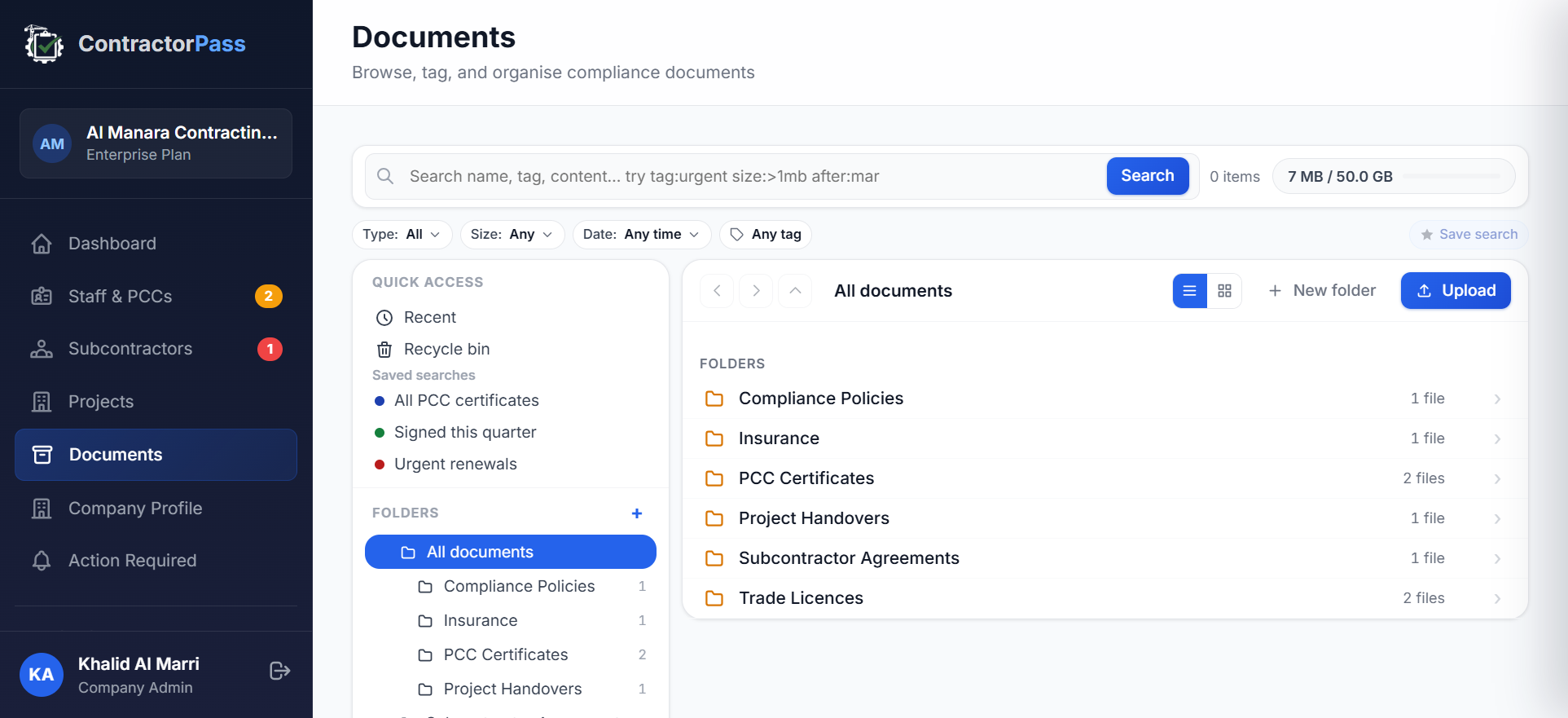
The Document Manager was built around Article 15.17's specific structure. Every document is uploaded against a project. Each project has a Completion Certificate date field that starts the 10-year retention timer. Every document uploaded to that project inherits the timer automatically. The dashboard shows exactly how many years remain on the retention obligation for every project.
Practical features that address the failure modes above:
- Retention timer per project. Set the Completion Certificate date once. The system tracks the remaining retention years automatically for every document under that project.
- Multi-dimensional tagging. Every document can be tagged with staff, subcontractor, or project references — so a DM inspector's cross-cutting question ("all documents related to Project X" or "every PCC certificate for engineer Y") resolves as one saved-search filter rather than a folder-by-folder hunt.
- Immutable audit trail per document. Every upload, download, and access is logged with timestamp and user, retrievable through the per-document activity view. Evidentiary integrity for DM audits.
- Recycle bin with 7-day soft-delete. Accidental deletions are recoverable for a week, then auto-purged. The trail doesn't grow indefinitely with orphaned drafts.
- Search across projects. A DM inspector asks for a specific subcontractor approval from a 2022 project. Search by name, tag, content, size, or upload date across every folder. Not "which employee remembers where they saved it."
How ContractorPass handles the other 11 tracking areas
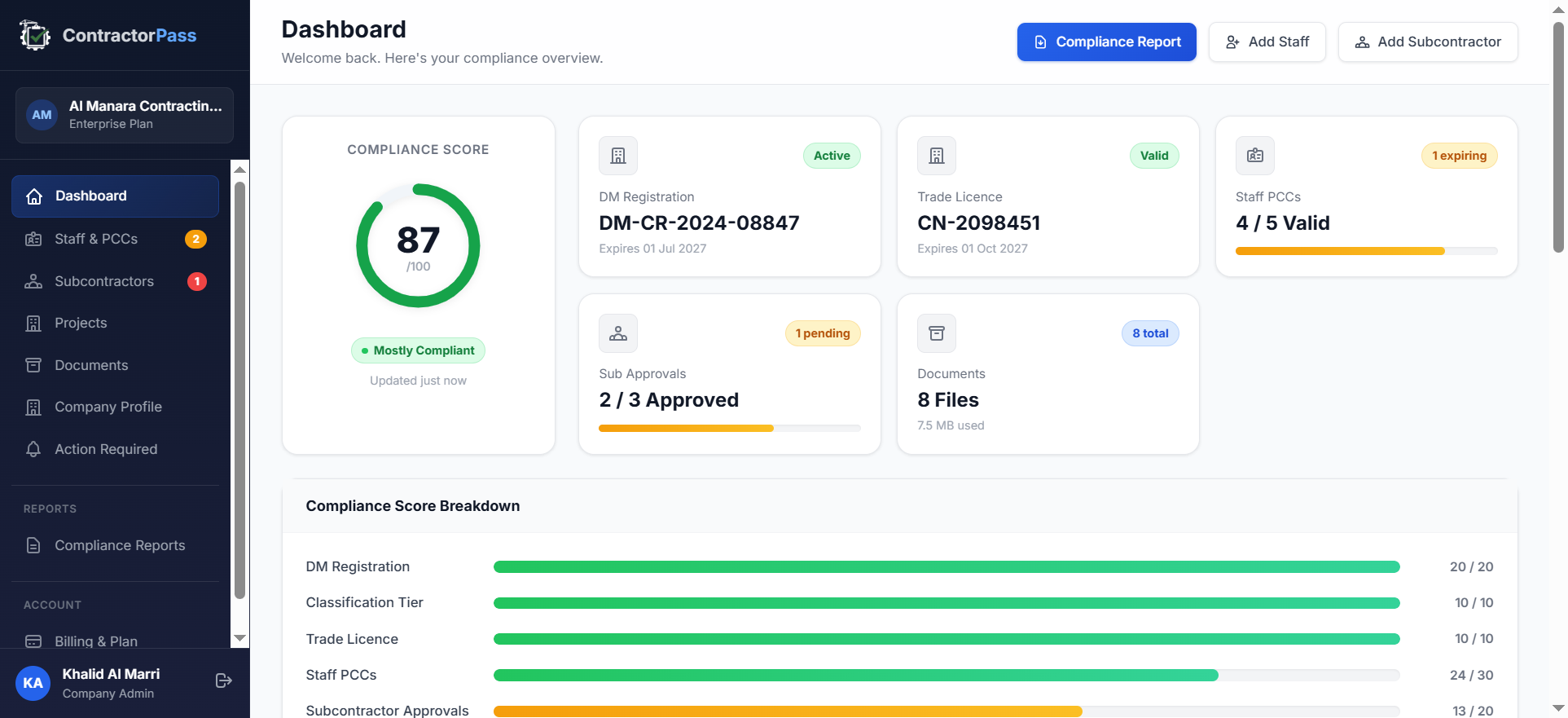
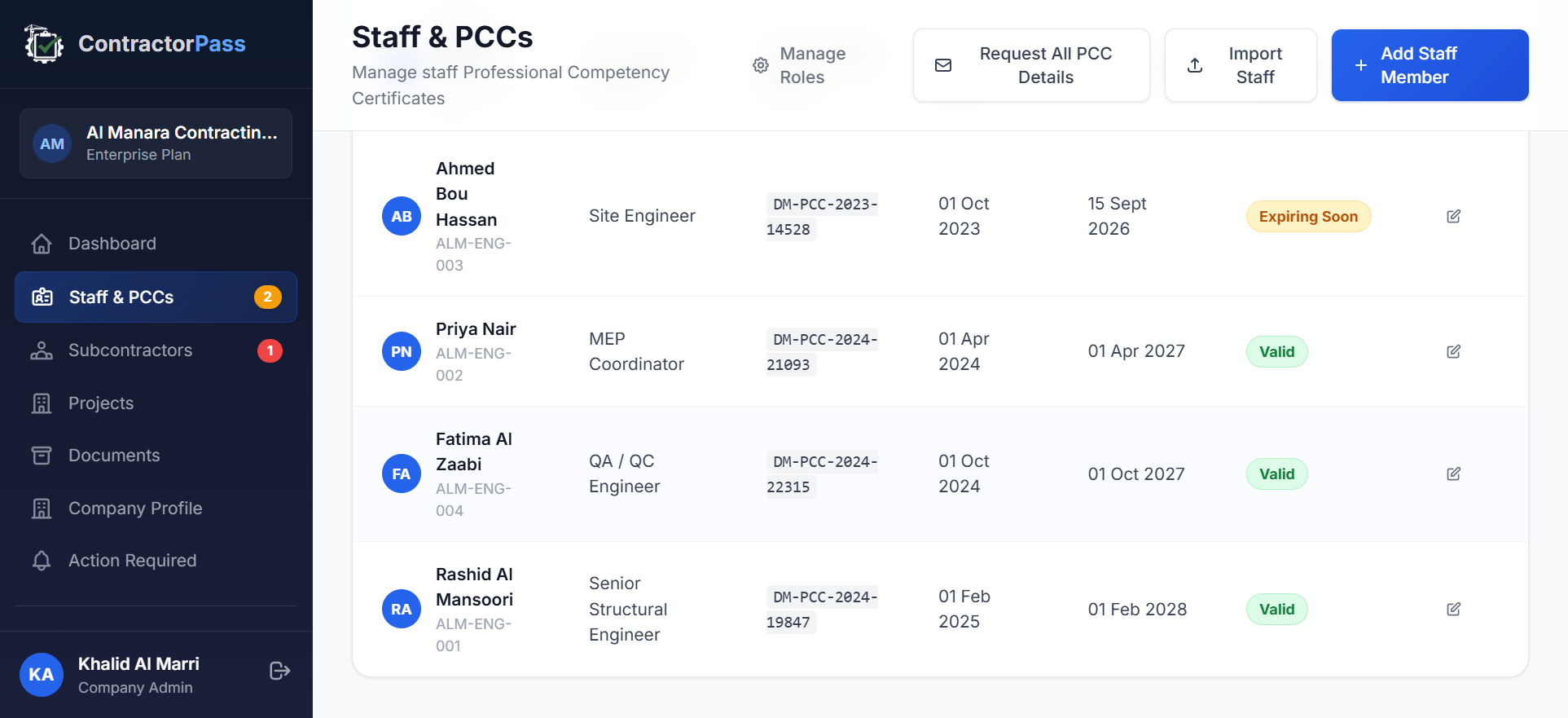
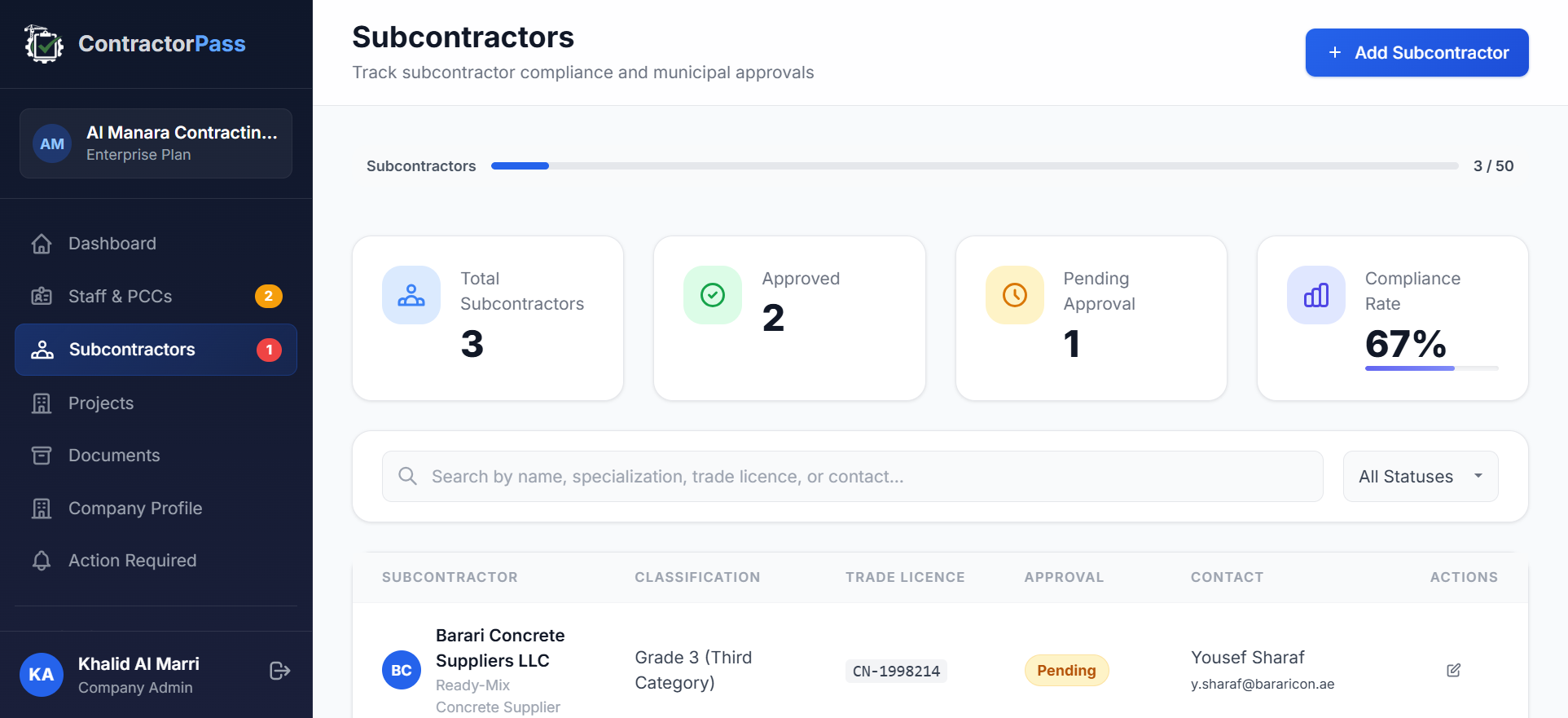
The Document Manager covers Article 15.17. The other 11 tracking areas each have a corresponding platform view. This table maps each tracking area to the specific ContractorPass feature and Law No. 7 Article:
| Tracking area | Law No. 7 Article | ContractorPass feature |
|---|---|---|
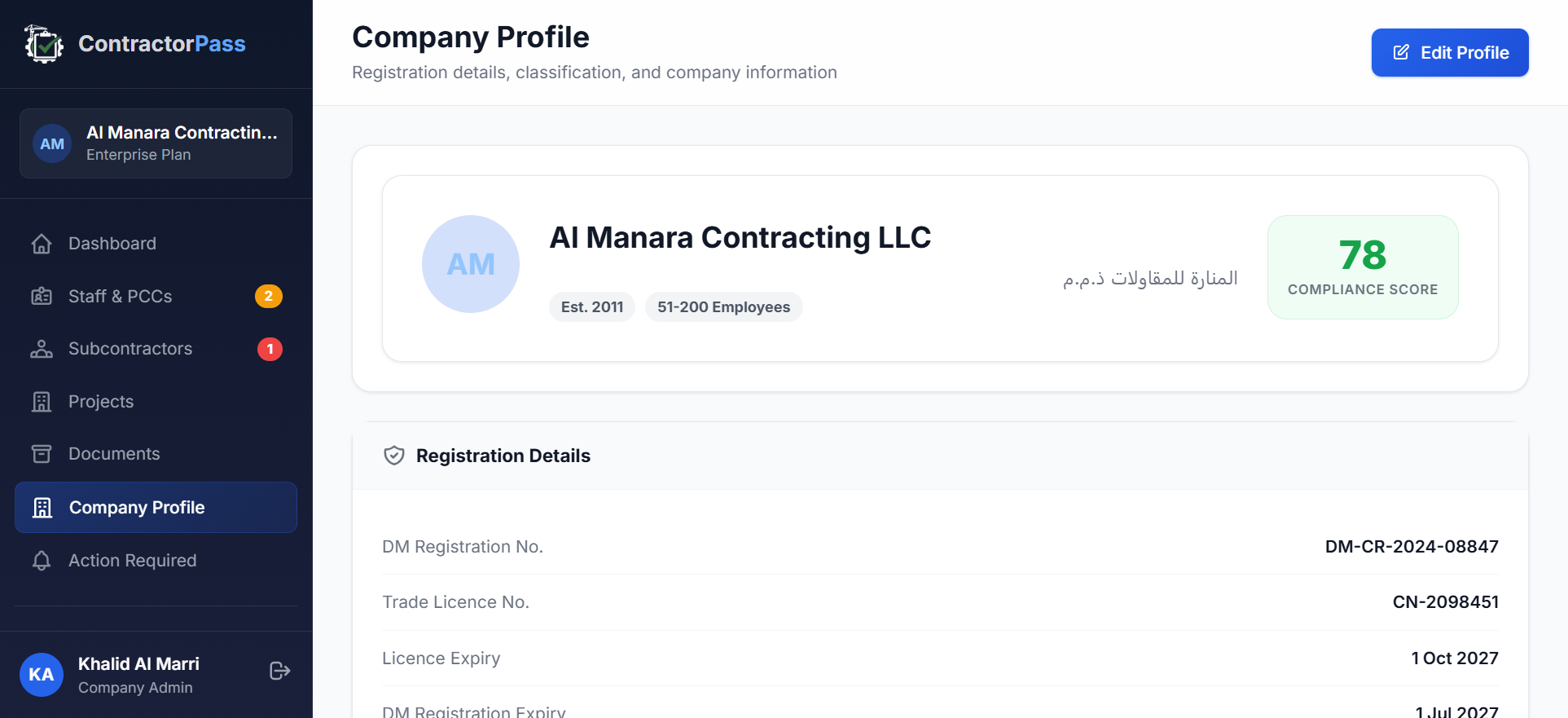
| Contractor Register status | Article 15.5, 15.9 | Company Profile view — see below |
| Trade licence validity | Article 15.9 | Company Profile view — trade licence expiry alerts |
| Technical staff PCCs | Article 15.3, Article 22(c)(5) | Staff & PCCs view — see below |
| Labour records per project | Article 15.11, 15.14 | Projects view |
| Subcontractor prior approvals | Article 15.12, Article 17 | Subcontractors view — see below |
| Project records | Article 15.11 | Projects view |
| Insurance policies | General good practice | Document Manager with insurance category + expiry alerts |
| Inspection results and rectifications | Article 15 general, Article 22 | Compliance Reports view |
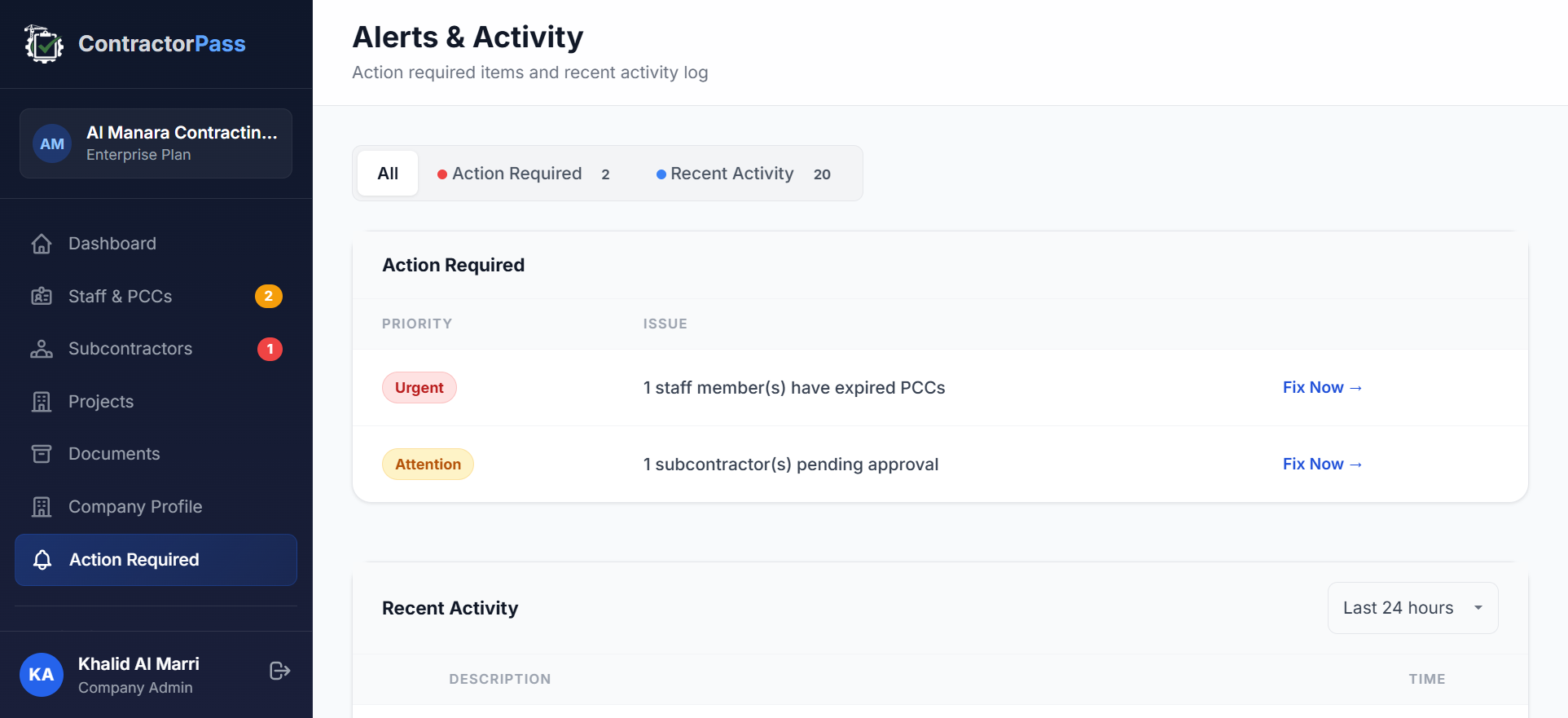
| Notification and reporting compliance | Article 15.9, 15.10, 15.15 | Alerts & Action Required feed — see below |
| Advertising and licence integrity | Article 15.8, 15.13 | Documented via Company Profile representations |
| Committee decisions and code of conduct | Article 15.16, 15.18 | Alerts feed — regulatory updates from the competent authority |
Excel vs Enterprise ERP vs ContractorPass — an honest comparison
No tool is the right answer for every contractor. Here is the honest matrix:
| Dimension | Excel + WhatsApp + folders | Enterprise ERP | ContractorPass |
|---|---|---|---|
| Ideal contractor size | < 5 technical staff, single project at a time | 500+ staff, multi-country operations, £50M+ projects | 5 to 500 technical staff, Dubai-focused |
| Setup cost | Free (already have Excel and OneDrive) | Enterprise-priced implementation, typically an order of magnitude above SaaS subscription | Free 14-day trial, then subscription |
| Time to first compliance dashboard | Weeks (building the spreadsheet) | Months (implementation + training) | Minutes (from signup to first dashboard view) |
| Dubai Law No. 7 native | No — you build the structure yourself | No — generic construction workflows adapted with custom fields | Yes — every feature maps to a specific Law No. 7 Article |
| PCC individual tracking | Manual — spreadsheet per staff member | Requires custom configuration | Built-in with expiry alerts |
| Subcontractor Article 17 approval workflow | Not modelled — email trail | Requires custom workflow build | Built-in with approval status tracking |
| 10-year retention timer per project | Not tracked — invisible until it matters | Retention policies exist but not keyed to Dubai Completion Certificate | Built-in, keyed to Completion Certificate date |
| DM audit-ready evidence | Reconstructed in a panic | Available with configuration | Immediate — generated from tracked data |
| Language and support | Whatever your team speaks | Typically US or European support, EMEA hours | UAE-hosted, English support, Dubai business hours |
The honest read: if you are a two-person contractor with one project running at a time, Excel is fine — the failure modes above are less severe at that scale. If you are a multi-national with £500M-plus projects, you probably already have an enterprise ERP. Between those extremes — the Dubai contractor with 10 to 300 staff and multiple concurrent projects — is where the Law No. 7-specific tracking becomes overwhelming for spreadsheets and where enterprise ERP is priced beyond what makes sense.
What to do this week (regardless of your tool)
Whether you stay on Excel, move to an ERP, or trial ContractorPass, these steps apply to every Dubai contractor operating under Law No. 7:
- Audit your PCC coverage. Pull a list of every technical staff member. Confirm each holds a current PCC. Note the expiry dates. Any expired or missing PCCs are immediate Article 15.3 exposure.
- Reconcile your subcontractor list. For every subcontractor currently engaged, confirm you have documented prior approval under Article 17 and that a supervising staff member is assigned under Article 15.12.
- Locate your Completion Certificates. For every project completed since 2016, find the Completion Certificate. Note the date. That is the day the 10-year retention clock started under Article 15.17.
- Test your document retrieval. Pick a project from three years ago. Ask a staff member who was not on that project to find its subcontractor approval documents in 15 minutes. If they can't, you have a retrieval problem an inspector will find.
- Prepare for the 8 January 2027 regularisation deadline. Existing contractors have until this date to regularise their status under Law No. 7. The clock is running.
If more than one of the five steps above is difficult for your team today, use the 7 warning signs guide to prioritise which fixes matter most — some warning signs are 30-day fixes, others can wait for the next renewal cycle.
Official References
- Dubai Municipality — official homepage
- Dubai Municipality — Consultants and Contractors Licensing Standards
- Dubai Legislation Portal — Committee decisions and implementing regulations under Article 15.16 and 15.18
Frequently Asked Questions
What are the ongoing compliance obligations for Dubai contractors after they register with Dubai Municipality?
Article 15 of Dubai Law No. 7 of 2025 imposes 18 statutory obligations that map to 12 practical tracking areas: contractor register status, trade licence validity, technical staff PCCs, labour records per project, subcontractor prior approvals, project records, insurance policies, inspection results, notification and reporting compliance, advertising and licence integrity, committee decisions and code of conduct, and 10-year document retention from Completion Certificate date. All 12 are enforced continuously from the date of registration.
What documents must Dubai contractors retain for 10 years under Article 15.17?
Article 15.17 requires retention of "project documents" for at least 10 years from the Completion Certificate date. Practical scope includes: signed contracts and variation orders, PCC copies for every technical staff member on the project, subcontractor approval evidence, DM inspection reports and rectifications, test certificates, handover documentation (as-built drawings, O&M manuals), incident and safety records, insurance certificates covering the project period, and any correspondence with the competent authority regarding the project.
When does the 10-year document retention period start?
The 10-year retention clock under Article 15.17 starts on the Completion Certificate date, not the project start date and not the physical handover date. Completion Certificates are typically issued weeks or months after physical works finish, so the retention period effectively runs from the date DM formally certifies project completion.
What happens if a Dubai contractor cannot produce documents during a DM audit?
Article 22(a) of Dubai Law No. 7 of 2025 authorises a fine from AED 1,000 to AED 100,000 per Article 15 violation, doubled to a maximum of AED 200,000 for repeat violations of the same clause within one year. Article 22(c) additionally authorises up to five administrative measures — suspension for up to one year, classification downgrade, Register removal, individual PCC cancellation, and technical-staff suspension — that stack on the base fine.
Is there compliance software specifically built for Dubai Law No. 7 of 2025?
Until 2026, no software had been built specifically to track Dubai Law No. 7 obligations. Generic enterprise construction ERPs (Procore, Oracle Aconex, Autodesk Construction Cloud) handle document management, RFIs, and drawings but are not modelled around the Dubai Municipality contractor register, classification tiers, PCC individual-level tracking, subcontractor Article 17 workflow, or the Article 15.17 10-year retention timer. ContractorPass is the first purpose-built platform we've seen in the Dubai market tracking these obligations as first-class features.
Can Dubai contractors use Excel to track Law No. 7 compliance?
Yes, for contractors with fewer than five technical staff and a single project at a time. At larger scale, the failure modes accumulate: PCC expiries missed after staff turnover, subcontractor approval status ambiguous, document version confusion, storage migrations losing files, retention timers invisible, and no audit trail. Article 15.17's 10-year retention rule is particularly hard to satisfy with folder-based storage because the retention clock is not something a folder system knows about.
How does Article 15.17 retention interact with the 8 January 2027 regularisation deadline?
The Article 26(a) regularisation grace period running from 8 January 2026 to 8 January 2027 is for regularising status under the new law — completing the DM Register entry, obtaining the classification tier, ensuring PCC coverage of technical staff. Article 15 obligations (including 15.17 retention) apply in full from the law's effective date of 8 January 2026, not from the end of the grace period. The grace period does not suspend enforcement of Article 15 or Article 22 penalties.
What is the difference between ContractorPass and Procore for Dubai contractors?
Procore is a global construction management platform built for the broader construction lifecycle — RFIs, submittals, drawing coordination, punchlists, and cost management across large projects. It can be adapted to track Dubai Law No. 7 items using custom fields and workflows, but this requires implementation effort. ContractorPass is built specifically for Dubai Law No. 7 tracking — every feature maps to a specific Article of the law, including PCC individual tracking, Article 17 subcontractor approval workflow, and the Article 15.17 10-year retention timer keyed to the Dubai Completion Certificate date. Procore fits large multi-project global operations; ContractorPass fits Dubai-focused contractors with 10 to 500 technical staff.