Why 2026 is the year Dubai Municipality audits accelerate
If you registered as a Dubai contractor under Law No. 7 of 2025, you're now in the enforcement window. The Law came into force on 8 January 2026. The Article 26(a) regularisation grace period closes on 8 January 2027 — but Article 22 penalties are enforced from day one, not from the end of the grace period. That means every operational contractor in Dubai right now is exposed to the same audit and penalty framework, whether they finished regularising or not.
Two engineering consultancy offices were already suspended in June 2025 by Dubai Municipality's Professional Practice Registration and Licensing Committee — before the Law had officially taken effect. Both firms were prohibited from obtaining licences for any new projects for six months. That precedent matters: Dubai Municipality is running active field enforcement and has publicly acted on serious violations. See the Rating System guide for the specific facts.
Most compliance failures don't announce themselves. They accumulate quietly — a lapsed PCC no one flagged, a subcontractor approval never documented, a project document folder no one has opened since 2023 — and then surface all at once when an inspector arrives with Article 23 inspection powers.
This guide walks through the seven warning signs that most contractors miss until an audit forces the reckoning. Each sign includes what to check, why it triggers Article 22 exposure, and how to fix it before the letter arrives.
Warning Sign 1: Your PCC list is out of date
Article 15 paragraph 3 requires every contractor to ensure that all technical staff members hold valid Professional Competency Certificates issued by Dubai Municipality. Article 22(c)(5) empowers the Competent Authority to cancel PCCs for named technical staff as an administrative sanction — meaning the individual and the contractor both take the hit.
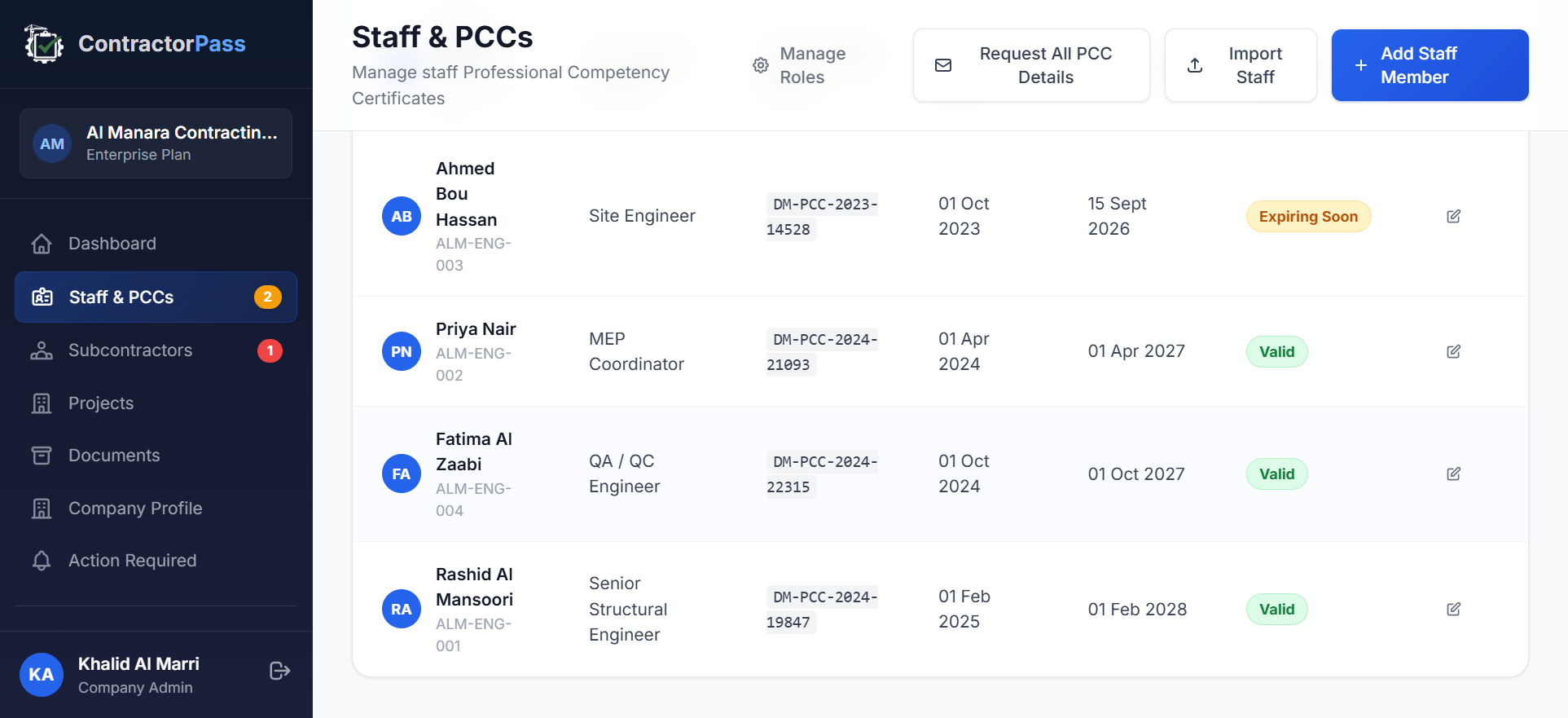
Auditors specifically ask for the current PCC certificate for every technical staff member deployed on any project you're currently executing. Not last year's list. Not the one in the induction folder. The current one.
How to spot the warning:
- The last time the PCC spreadsheet was updated, the staff member who owned it still worked there
- You've hired at least one technical staff member in the past year and can't confirm whether their PCC application closed
- A staff member left more than three months ago but their PCC record is still marked "active" in your files
- You can't produce, in five minutes, a list of every technical staff member with their PCC number and expiry date
Any of those is a warning sign. For the underlying PCC application, exam, and renewal process, see the Professional Competency Certificate guide for Dubai contractors.
Warning Sign 2: You engage subcontractors without documented prior approval
Article 17 of Law No. 7 makes prior written approval from the Competent Authority a precondition of any subcontractor engagement. Article 15 paragraph 12 then places an ongoing obligation on the main contractor to supervise and monitor each approved subcontractor throughout the project. The two clauses together mean that both the initial engagement AND the ongoing supervision must be evidenced on demand.
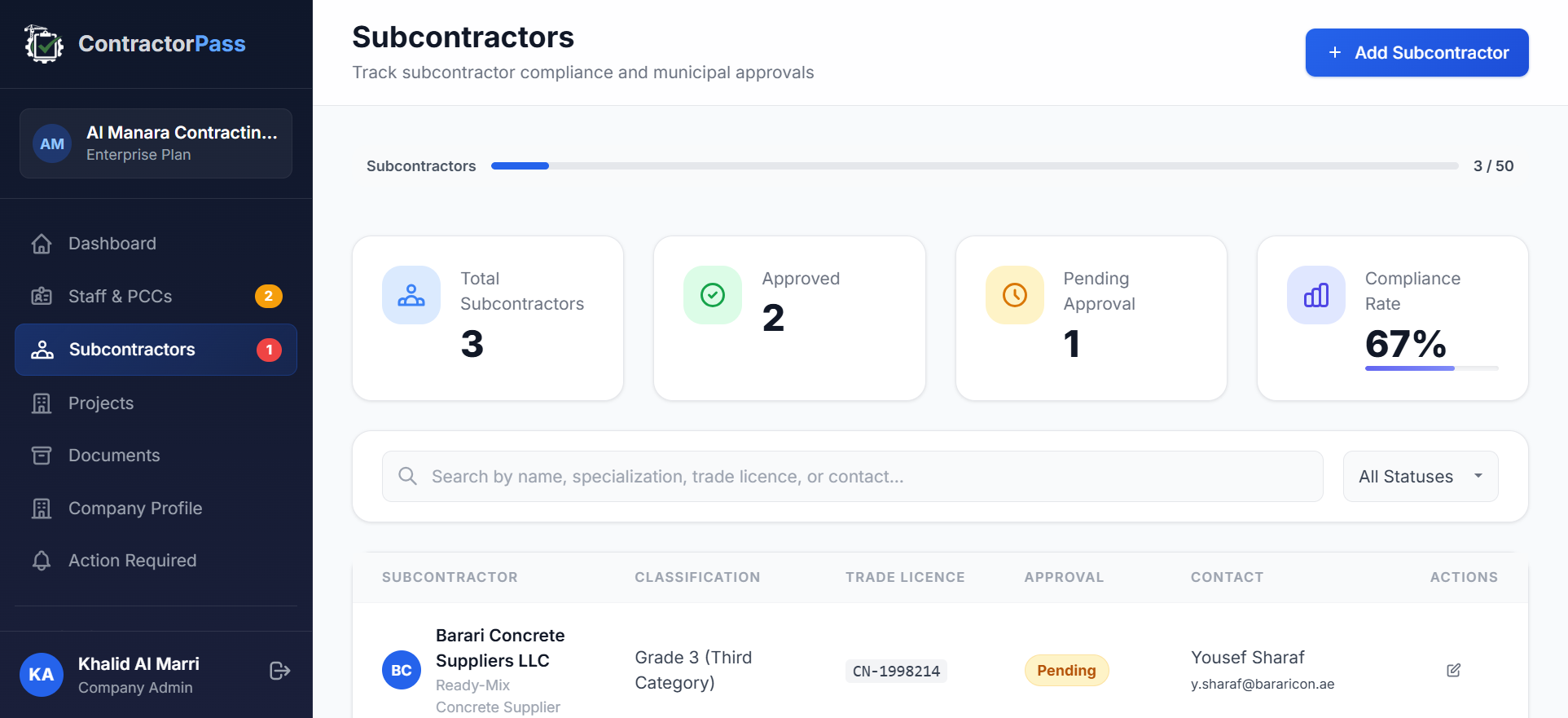
The most common failure pattern isn't a missing subcontractor. It's a documented engagement with undocumented approval. The subcontractor is real, the contract is signed, the work is happening — but the approval letter is in an email attachment nobody can find, or was verbally agreed by someone who has since left DM. That's an Article 17 breach the moment an inspector asks.
How to spot the warning:
- You have a subcontractor currently on site but cannot locate the DM prior-approval letter
- You know which staff member is "responsible for" a subcontractor but there's no written assignment on file
- The subcontractor's approval was renewed at some point, but you can't confirm whether the current approval letter or the original one is on file
For the full mechanics of Article 17 prior approval and the Article 15.12 supervisory duty, see the Dubai subcontractor approval guide.
Warning Sign 3: You can't produce documents from projects completed more than two years ago
Article 15 paragraph 17 requires contractors to retain project documents for at least 10 years from the date of the Completion Certificate. The retention obligation is continuous — a project you completed in 2020 is still within retention until 2030, even though the project itself has been closed for years.
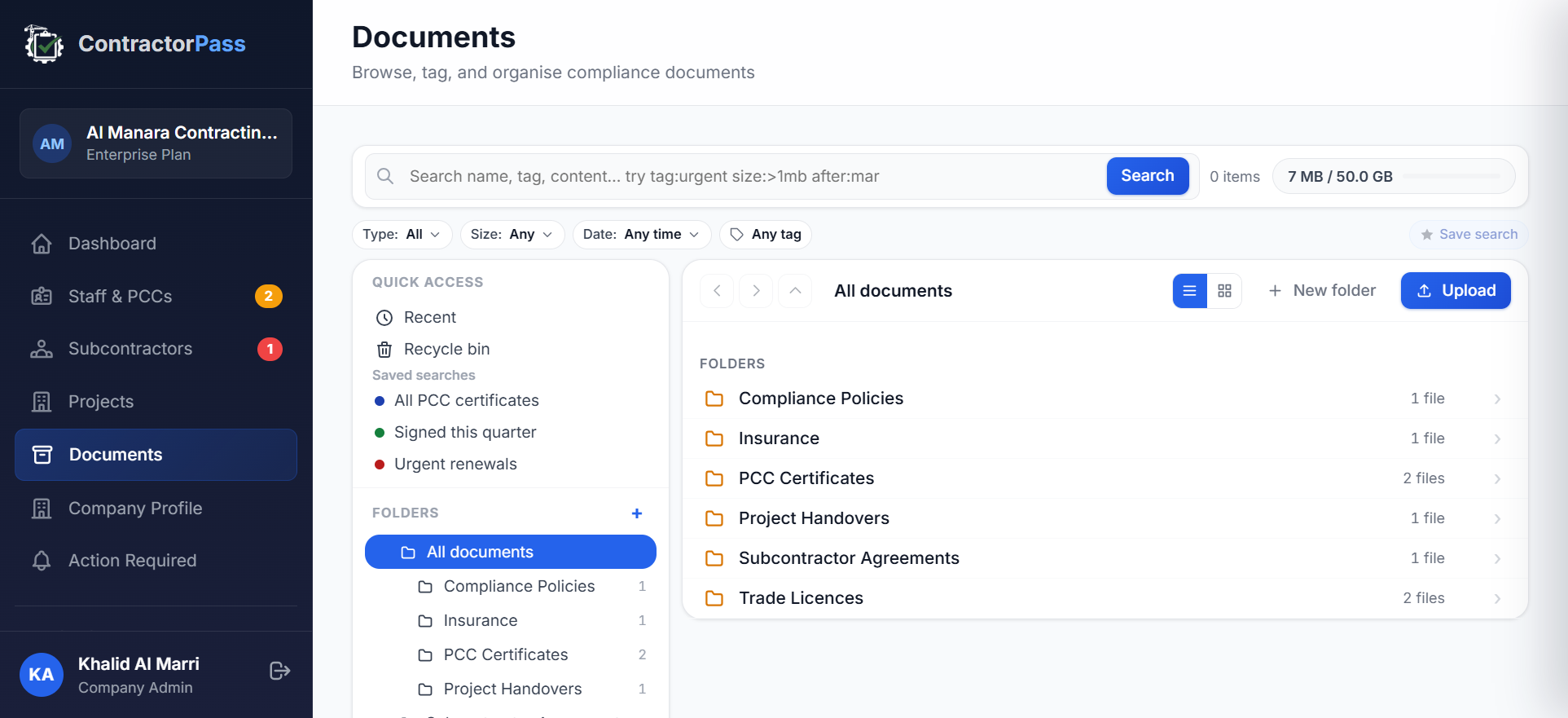
The failure mode is universal and predictable. Storage systems change. Staff leave. Folders get reorganised. Files with special characters silently break when moved between OneDrive and Google Drive. By year five of a project's retention window, the person who organised the original folder is often gone, and the person who inherited it never opened it. The retention obligation quietly becomes theoretical.
An inspector who asks for a specific document from a 2022 project isn't checking whether you have a folder somewhere. They're checking whether you can produce the document within a reasonable timeframe on the day of the audit. "It's in an old folder" is not a compliant answer.
How to spot the warning:
- Pick a project you completed in 2023 or earlier. Ask a current staff member who wasn't on that project to find its subcontractor approval documents in 15 minutes. If they can't, the trail is broken.
- You've migrated document storage systems at least once in the past three years without a formal reconciliation
- You have no version-control system for project documents beyond "whoever last saved"
The 12 operational tracking areas Article 15 imposes — including Article 15.17 retention — are covered in detail in the ongoing compliance tracking guide.
Warning Sign 4: Your classification tier doesn't match your active project pipeline
Article 14 governs how contractors are classified into tiers based on financial capacity and technical scale. Article 15 paragraph 5 requires the contractor to operate strictly within their approved classification — bidding for or executing projects that exceed the tier's scope is a violation whether or not the project itself is delivered successfully.
The most common trigger isn't outright over-reach. It's slow drift. A contractor classified for medium-scale projects wins a bid that's above their category by a small margin because the client wanted them specifically. The project runs, the deliverables happen, the client is satisfied — and a DM audit later flags the entire engagement as an Article 15.5 breach retroactively. Article 22 sanctions can then follow.
How to spot the warning:
- You've won a project in the past two years that you privately know is above your classified tier ceiling
- Your current project pipeline includes at least one engagement where the total contract value exceeds what your classification permits
- You've been operating in the same tier for more than three years without reviewing whether it still matches your capacity — either you should upgrade, or you should be aware you might be flagged
For the full framework of tier mechanics, upgrade paths, and downgrade triggers, see the Dubai contractor classification guide.
Warning Sign 5: You've received Dubai Municipality correspondence you didn't respond to on time
Article 15 paragraph 9 imposes a specific timing rule: any change to the data on which the contractor was registered — company name, address, technical staff, ownership — must be notified to the Competent Authority within five working days. Article 15 paragraph 10 imposes an ongoing obligation to submit periodic reports as required by the Competent Authority. Article 15 paragraph 15 covers general cooperation with any information request from the Competent Authority.
The most common pattern: DM sends a letter or email to the registered address or general company inbox. The letter sits unread for a week because the person who monitors that inbox is on leave, or the letter was misfiled as "probably not urgent." By the time it surfaces, the five-day window is closed and the response is late. That itself becomes an Article 15.9 or 15.10 violation, on top of whatever the original correspondence was about.
How to spot the warning:
- DM correspondence in the past 12 months has gone to a general company inbox with no named owner monitoring it
- You cannot immediately name the person responsible for reviewing every letter or email from Dubai Municipality within 24 hours of receipt
- You've had a company detail change — address, ownership, technical staff — in the past six months where you're unsure whether the 5-day notification was filed
Setting up a named inbox owner with a service-level of "all DM correspondence reviewed within one working day" is a simple operational fix that closes this warning sign entirely.
Warning Sign 6: Your compliance officer manages everything in Excel and WhatsApp
This isn't a direct legal risk. It's a scale risk. Excel and WhatsApp work fine when the contractor has fewer than ten technical staff, a single project at a time, and one compliance officer who's been in the role for years. They begin to break — quietly, predictably — when the contractor has 30+ technical staff, multiple concurrent projects, staff turnover in the compliance role, and a growing tail of past projects still in retention.
Specific failure modes at scale:
- The PCC spreadsheet has a column for expiry date but no alert mechanism — expiries are noticed when someone happens to look, not when they matter
- The subcontractor list is one spreadsheet, the approval letters are in a shared folder, the supervising staff assignments are in an email thread — three sources, no single view
- Project documents are in per-project folders, but no retention timer flags which projects are approaching their 10-year Article 15.17 deadline
- The compliance officer resigns, and the handover is a spreadsheet plus a two-hour walkthrough — the new person has no view of the operational history
None of these break the law. They just make it dramatically harder to demonstrate compliance when the audit arrives. The 12 tracking areas that Article 15 imposes are covered continuously by the ongoing tracking guide — including how the failure modes compound as the contractor scales.
Warning Sign 7: You've never run an internal mock audit
DM auditors don't announce themselves. Article 23 explicitly gives them the power to enter without prior notice. The only way to know how a real audit would go is to run one yourself, internally, before the letter arrives.
A mock audit is not complicated. Pick a compliance officer or senior team member who was not directly involved in the projects being sampled. Give them the eight document categories that a real DM inspector would ask for. Time how long each takes to produce, and flag anything that takes more than five minutes or requires asking someone else where a file is stored.
The full pre-audit walkthrough — including the 30-day countdown, the eight evidence categories, and the specific documents inspectors ask for — is in the DM audit survival guide. Run the mock at least annually, and any time there's been a significant staff change in the compliance function.
How to spot the warning:
- You have never run a formal mock audit against Article 15's obligations
- You have never timed how long it takes to produce a specific document from a two-year-old project
- Your compliance officer has changed within the past year and you have not re-run the mock since
What to do if you spot two or more of these warning signs
Two or more warning signs isn't a crisis — it's the norm for a mid-size Dubai contractor who has been operating in the pre-Law-No.-7 environment. What matters is triage: fix the highest-severity signs first, on a 30-day / 90-day / next-renewal timeline.
Fix within 30 days:
- Any expired PCC on active technical staff (Warning Sign 1) — highest exposure, cheapest fix
- Any active subcontractor without documented prior approval (Warning Sign 2) — Article 17 exposure on every day the arrangement continues
- Any unresponded DM correspondence (Warning Sign 5) — file the response, apologise for the delay, restart the clock
Fix within 90 days:
- Document retrieval trail for projects completed in the past three years (Warning Sign 3) — spend one day per project consolidating documents into a retrievable structure
- Classification tier vs pipeline mismatch (Warning Sign 4) — decide whether to apply for an upgrade or narrow the pipeline
- Run a first mock audit (Warning Sign 7) — reveals which other signs are actually present
Fix before the next renewal:
- Compliance system upgrade if Excel and WhatsApp are failing at scale (Warning Sign 6) — plan the move over the next quarter, don't do it in an audit-response panic
The choice between hiring a consultant, using compliance software, or doing this in-house depends on scale. A contractor with fewer than 15 technical staff can typically run the 30-day items in-house with a one-off consultant sprint. Contractors with 30 or more technical staff, active subcontractor arrangements, and a growing document trail typically find that software plus quarterly consultant reviews is the sustainable answer.
How ContractorPass surfaces these warning signs
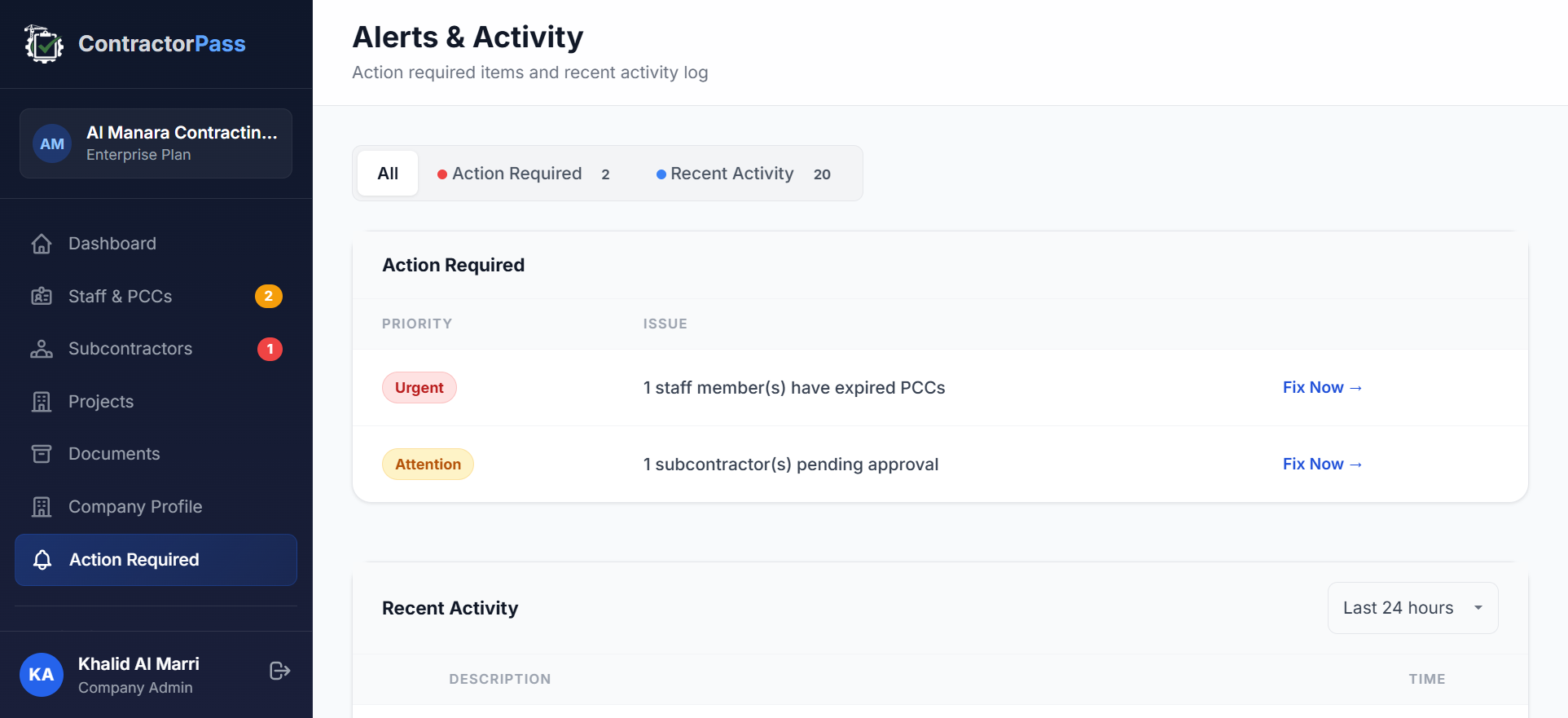
ContractorPass was built specifically around Law No. 7 tracking. Every one of the seven warning signs above maps to a specific view in the platform:
- Warning Sign 1 (PCC expiries) — Staff & PCCs view with expiry timers and alert badges (Valid / Expiring Soon / Expired)
- Warning Sign 2 (subcontractor approvals) — Subcontractors view with approval status, DM approval number, and approval expiry tracking
- Warning Sign 3 (document retrieval) — Document Manager with per-project folders, retention timers, tagging, and cross-project search
- Warning Sign 4 (classification tier) — Company Profile with classification tier stored alongside active project scope
- Warning Sign 5 (DM correspondence) — Alerts feed with named-user notifications for regulatory updates
- Warning Sign 6 (Excel/WhatsApp scale limits) — the platform itself replaces the Excel/WhatsApp pattern with a single system of record
- Warning Sign 7 (mock audit) — the Compliance Report generator produces the same document set a DM inspector would ask for, on demand
Honest scope: ContractorPass is a compliance tracking system, not a legal advisory service. It surfaces the warning signs, tracks the underlying data, and produces the reports — the interpretation of the law and the strategic decisions about how to respond are still yours. What the platform gives you is the operational discipline to see problems weeks before an auditor would.
Official References
- Dubai Official Gazette No. 726/59 — Law No. 7 of 2025 (Arabic legal text, includes Article 22 penalties, Article 23 inspection powers, and Article 24 grievance mechanism)
- Dubai Municipality — Consultants and Contractors Licensing Standards
- Dubai Municipality — official homepage
- Dubai Legislation Portal — implementing regulations and Committee decisions under Law No. 7
Frequently Asked Questions
What happens if Dubai Municipality inspects my contractor business and I fail?
A failed DM inspection under Law No. 7 of 2025 triggers Article 22 sanctions. Article 22(a) authorises fines from AED 1,000 to AED 100,000 per violation, doubled on repeat of the same violation within one year, capped at AED 200,000. Article 22(c) stacks up to five additional administrative measures: suspension for up to one year, classification downgrade, Register removal plus trade licence cancellation, individual PCC cancellation for named technical staff, and technical-staff suspension. The specific measure depends on the severity of the violation and the contractor's history.
How often does Dubai Municipality audit contractors?
Law No. 7 does not fix an audit frequency — inspections are conducted at the discretion of the Competent Authority. In practice, contractors report being inspected on renewal cycles, on receipt of specific complaints, and increasingly through random spot-check programmes. Two engineering consultancy offices were already suspended in June 2025 before the Law even fully took effect, signalling that Dubai Municipality treats compliance enforcement as continuous rather than periodic.
Can I request advance notice of a Dubai Municipality audit?
No. Under Article 23 of Law No. 7, inspectors are empowered to enter your business headquarters and project sites without prior notice, and Article 15 paragraph 14 places an obligation on the contractor to enable that access — refusing or obstructing an inspector is itself a violation of the Law. Contractors who want predictable audit conditions must run their own mock audits internally, since the real one arrives when the Competent Authority chooses.
What documents does Dubai Municipality ask for during a contractor audit?
Based on Article 15's obligations and Article 23's inspection powers, DM inspectors typically request: the trade licence and DM Register entry, current classification certificate, Professional Competency Certificates for every technical staff member deployed on site, subcontractor prior-approval evidence and supervising-staff assignments, project records including scope and labour deployment, insurance certificates covering the audit period, and any correspondence with the competent authority. Article 15.17 requires retention of project documents for at least 10 years from the Completion Certificate date, so documents from projects up to a decade old can be requested.
How much does a Dubai contractor compliance failure cost in total?
The direct fine range under Article 22(a) is AED 1,000 to AED 100,000 per violation, capped at AED 200,000 for repeat violations of the same clause within one year. But the harder cost is often indirect: a classification downgrade under Article 22(c)(2) reduces the scope of projects you can bid on, a suspension under Article 22(c)(1) halts all bidding for up to a year, and Register removal under Article 22(c)(3) ends the ability to practise contracting activities in Dubai entirely. For an active contractor, an operational-scope penalty typically costs more in lost project pipeline than the fine itself.
Can I appeal a Dubai Municipality fine or classification downgrade?
Yes. Article 24 of Law No. 7 provides a grievance mechanism. A contractor aggrieved by a decision issued under the Law may submit a written grievance to the Director General of Dubai Municipality within 30 days of the date they were notified of the decision. The Director General or a delegate reviews the grievance, and their decision is final at that level. Timing is critical — the 30-day window is strict, so any decision received should be logged and reviewed for appeal well before the deadline.
Should I hire a compliance consultant or use compliance software for Dubai Law No. 7?
The two aren't mutually exclusive. Consultants are useful for one-off events: an initial gap assessment, a pre-audit mock, or preparing a specific submission. Compliance software is for the continuous work in between: tracking PCC expiries as they approach, logging subcontractor approvals as engagements start, maintaining the 10-year document trail as projects close. A common pattern is a consultant for the annual review plus software for daily tracking — the two complement each other rather than compete. Software alone works for small contractors with straightforward operations; a consultant alone works for one-off filings but leaves the daily discipline gap.
How do I self-audit my Dubai contractor compliance before Dubai Municipality does?
Run a mock audit against Article 15's 18 obligations. Practically: (1) list every technical staff member and confirm each holds a current PCC; (2) list every current subcontractor and confirm you have prior-approval documentation plus a supervising-staff assignment; (3) pick a project completed in the last five years and ask someone who wasn't on the project to find its full document trail within 15 minutes; (4) verify your classification tier matches the scope of every active project; (5) confirm your registered address and contact details on the DM Register are current. Any of the five steps failing is a warning sign that the real audit would find the same gap.